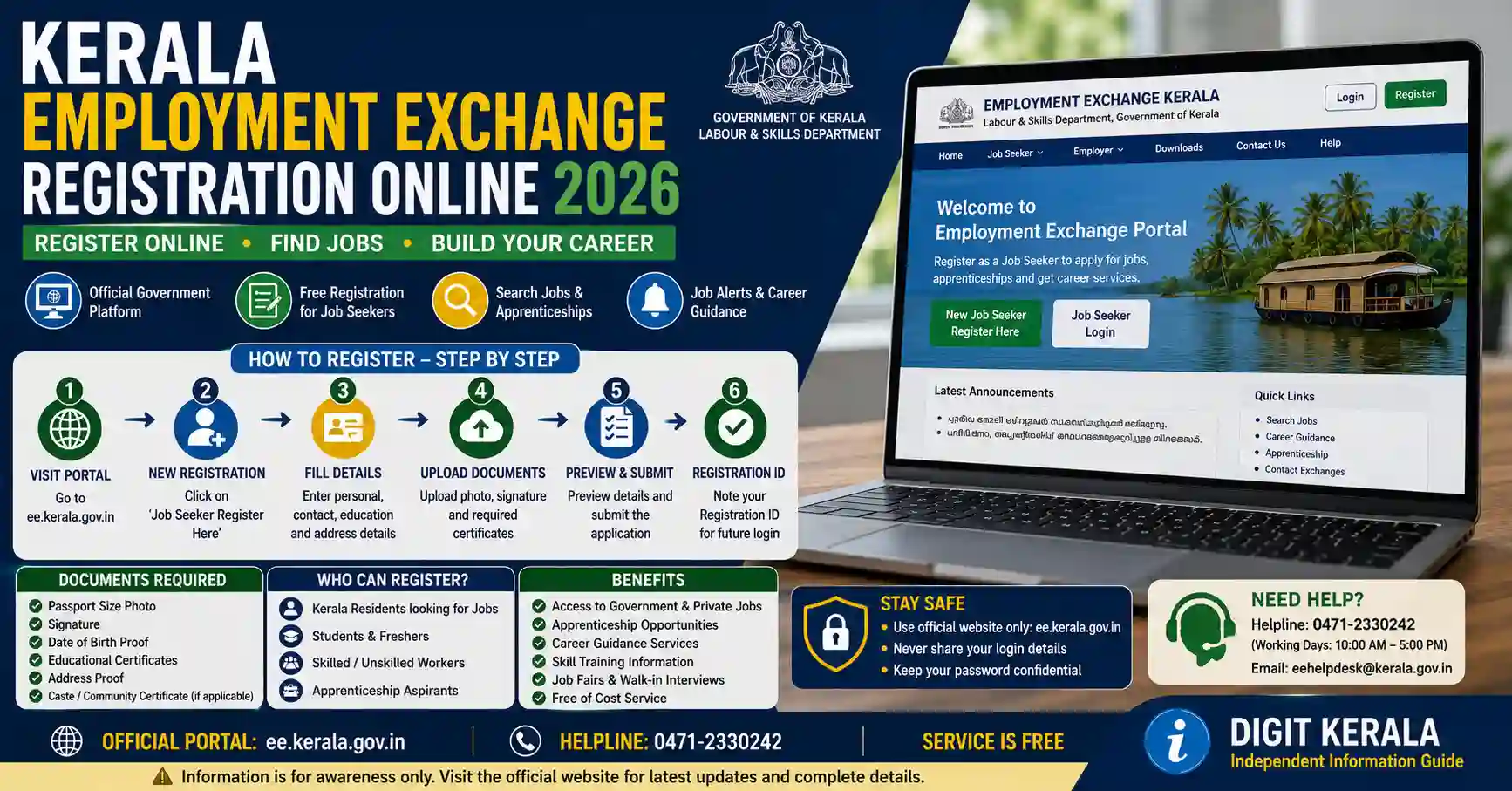
Kerala Employment Exchange services are available online through the Employment@KERALA e-Employment portal. Eligible jobseekers can use the portal for new registration, renewal, adding qualifications or experience, re-registration and certain registration-transfer services.
Completing an online registration is only one part of the process. The Kerala Employment Department states that original certificates must be produced at the relevant Employment Exchange within the prescribed period to retain seniority from the original online-registration date.
This guide explains the Kerala Employment Exchange online-registration process, required documents, certificate verification, renewal rules and common mistakes applicants should avoid.
Important: Employment Exchange registration does not guarantee a government job, temporary appointment, interview or selection. Sponsorship and recruitment depend on notified vacancies, eligibility, seniority and the applicable selection procedure.
What Is the Kerala Employment Exchange?
Employment Exchanges function under the Kerala Employment Department, which is part of the state’s Labour and Skills administrative system.
The department acts as an interface between jobseekers and employers. Its services include registration, renewal and sponsoring eligible candidates against vacancies reported to the Employment Exchange.
The department also provides career guidance and information relating to employment and self-employment programmes.
The official online service is called Employment@KERALA or the e-Employment Exchange.
Official Kerala Employment Websites
Use only these official government portals:
- Kerala Employment Department
- Employment@KERALA e-Employment Portal
- Online Registration and Renewal Information
- Registration Help and Instructions
Check that the website address ends in kerala.gov.in before entering personal information.
Avoid websites and agents claiming to provide guaranteed Employment Exchange appointments or government jobs.
Services Available Through Employment@KERALA
The Kerala Employment Department states that the online portal supports services such as:
- New jobseeker registration.
- Registration renewal.
- Addition of educational qualifications.
- Addition of experience.
- Re-registration.
- Registration transfer.
- Seniority-list viewing.
- Access to relevant notices and schemes.
- Login creation for existing registrants.
Some services can be initiated online but may require the applicant to visit the relevant Employment Exchange with original documents.
Follow the latest instructions displayed for the selected service.
Who Can Register?
According to the Kerala Employment Department:
- The minimum age for registration is 14 years.
- No maximum age limit has been prescribed for registration.
- Literacy is stated as the minimum educational requirement.
- A candidate should register with the Employment Exchange having jurisdiction over the place where the person resides.
Registration alone does not make an applicant eligible for every vacancy. Each vacancy may have separate conditions relating to age, education, experience, reservation, licences and other requirements.
Register Only With the Correct Employment Exchange
A candidate should register with the Employment Exchange responsible for the area in which the candidate resides.
The Employment Department warns that dual registration is treated as an offence and may result in forfeiture of registration.
Do not create separate local registrations using different addresses merely to increase employment opportunities.
Certain rules may apply to applicants with professional or executive qualifications and to ex-servicemen. Such applicants should check the official instructions or contact the responsible Employment Exchange before creating an additional category of registration.
Documents Required for Registration and Verification
The official department page lists the following categories of original documents for registration or verification.
Proof of Residence
Accepted residence-related documents may include:
- School or college certificate.
- Ration card.
- Elector Photo Identity Card.
- Electoral-roll extract.
- Passport.
- Residential certificate from a revenue authority.
- Residential certificate from a local body.
- Nativity certificate issued by the Village Officer.
- Other documents included in the department’s current instructions.
The selected document should support the address and jurisdiction entered during registration.
Proof of Age
Use an authorised document showing the applicant’s correct date of birth.
The name and date of birth entered online should match the supporting record.
Educational Certificates and Mark Lists
Carry original certificates and mark lists supporting every qualification entered in the registration.
Do not add an incomplete course as a completed qualification.
Experience Certificates
Applicants claiming employment experience should provide acceptable experience documentation.
The certificate should clearly identify the employer, role and employment period where applicable.
Community or Reservation Certificate
Applicants claiming the benefit of a reservation category must provide the applicable certificate in the format and validity required by the authority.
Do not select a reservation category without suitable supporting documentation.
Disability Certificate
Applicants registering under an applicable disability category should produce the required medical or disability certificate.
Certificates for Special Claims
Original documents may be required for claims relating to:
- Widowhood.
- Divorce.
- Marital status.
- Inter-caste marriage.
- Another recognised priority or benefit.
Requirements vary according to the claim. Check the latest official instructions before visiting the Employment Exchange.
How to Register Online
Follow these general steps:
- Open the official Employment@KERALA portal.
- Select the Jobseeker Registration option.
- Choose the applicable option for a new or existing registrant.
- Enter the requested personal information.
- Provide the applicant’s current residential details.
- Select the relevant district and Employment Exchange carefully.
- Enter educational qualifications.
- Add experience and skills when applicable.
- Enter reservation or priority details only when supported by valid documents.
- Create login credentials using the current portal process.
- Review every entry.
- Submit the registration.
- Save or print the acknowledgement and temporary registration information.
- Note the certificate-verification instructions and deadline.
The portal layout and button names may change. Follow the current instructions shown on the official website.
Existing Registrants May Need to Create a Login
The Employment@KERALA portal states that people already registered at a Kerala Employment Exchange, as well as first-time online registrants, can use the jobseeker-registration option to create a login ID.
Do not create a completely separate registration if an existing Employment Exchange record is already active.
Use the existing-registration option when available. If the old registration details cannot be found, contact the relevant Employment Exchange or the portal’s official help service before submitting a duplicate record.
Original Certificate Verification Within 90 Days
This is one of the most important requirements.
According to the Kerala Employment Department, a candidate who registers online should report to the relevant Employment Exchange with the original certificates within 90 days of online registration.
Completing verification within this period allows the candidate to retain seniority from the online-registration date.
If the original documents are not produced within the specified period, the candidate may lose the seniority attached to the original online-registration date.
Therefore:
- Note the date of online registration.
- Identify the correct Employment Exchange.
- Arrange the original documents.
- Visit within the prescribed period.
- Obtain confirmation that verification is complete.
- Keep the verified registration details safely.
Do not wait until the final day because holidays, document problems or jurisdiction errors may cause delays.
What Is Employment Registration Seniority?
Seniority generally refers to the effective registration date used for Employment Exchange processes.
The applicable seniority for a qualification or registration can be important when eligible candidates are considered against reported vacancies.
Online submission alone may not preserve the original seniority if document-verification requirements are not completed on time.
Seniority does not guarantee sponsorship or appointment. The candidate must also meet the requirements of the notified vacancy.
How to Renew Employment Registration Online
Employment registration must be renewed within the applicable period to remain active.
The portal provides a dedicated Online Renewal Service.
General renewal steps are:
- Open the official Employment@KERALA website.
- Select Renew Your Registration.
- Enter the district and other requested registration details.
- Complete the displayed verification.
- Confirm the registration record.
- Submit the renewal request.
- Save or print the updated registration information.
- Check the new renewal date.
Do not rely only on a verbal confirmation. Verify that the renewal is reflected in the official record.
Kerala Employment Registration Renewal Period
The Kerala Employment Department states that the standard renewal period is three years for all categories of applicants.
A registrant is generally allowed to renew during:
- The month in which renewal becomes due.
- The following month.
- The second month following the due month.
The department’s help page states that SC and ST candidates are allowed to renew within one year from the month in which renewal falls due.
Rules and special-renewal orders may change. Always verify the current renewal period on the official portal.
Do Not Depend on Special Renewal
The Government may occasionally issue a special-renewal order for registrations that lapsed during a specified period.
A special-renewal facility is not continuously available and should not be assumed.
Renew the registration within the normal period instead of waiting for a possible future order.
The Employment Department also states that unemployment allowance will not be granted to registrants who fail to renew on time and later renew only through a special-renewal order.
Eligibility for any benefit remains subject to all applicable rules.
Adding a New Qualification
Applicants can add an additional qualification to an existing Employment Exchange registration.
Examples may include:
- SSLC or equivalent qualification.
- Plus Two or equivalent qualification.
- ITI.
- Diploma.
- Degree.
- Postgraduate qualification.
- Recognised technical qualification.
- Another eligible certificate.
General steps are:
- Sign in to the official portal.
- Find the qualification-addition service.
- Enter the qualification information accurately.
- Submit the online request.
- Save the acknowledgement.
- Produce the original certificate and mark list at the relevant Employment Exchange within the required period.
The department states that seniority for an additional qualification is effective from the date on which that qualification is added.
For an online qualification addition, the original certificate should be produced within 90 days. Failure to complete verification may result in loss of seniority for the added qualification.
Adding Work Experience
Applicants may add eligible work experience to their registration.
Enter only genuine experience that can be supported by acceptable documents.
Candidates who completed temporary employment obtained through the Employment Exchange or through their own efforts may need to produce the prescribed discharge certificate within the specified period after leaving the position.
The department’s help page refers to a period of 90 days from relief of duty for producing the relevant discharge certificate.
Applicants should contact the responsible Employment Exchange when they are unsure whether an experience or discharge certificate meets the requirements.
Transferring Registration After Moving
An applicant who changes permanent residence may request a transfer to the Employment Exchange responsible for the new location.
The Kerala Employment Department states that registration can be transferred without losing the original seniority when the applicable procedure is followed.
The applicant should report to the new Employment Exchange with:
- Employment registration identity card or details.
- Documents supporting the new permanent address.
- Other records requested by the authority.
Do not create a second local registration after moving. Use the official transfer procedure.
Registration, Sponsorship and Appointment Are Different
These terms should not be treated as identical.
Registration
The candidate’s details are included in the Employment Exchange record after completing the applicable requirements.
Sponsorship
The Employment Exchange may forward or advise the names of eligible registered candidates against a vacancy reported by an employer.
Selection
The employer or recruiting authority conducts the applicable selection process.
Appointment
An appointment is issued only after the responsible authority completes the required recruitment and verification.
Registration does not guarantee sponsorship, and sponsorship does not guarantee selection or appointment.
Does Employment Registration Guarantee a Government Job?
No.
Employment Exchange registration may help an eligible candidate be considered for certain vacancies reported through the system. It does not provide an automatic right to employment.
Candidates should also monitor:
- Kerala PSC notifications.
- Central-government recruitment portals.
- Official department recruitment pages.
- Apprenticeship portals.
- National Career Service.
- Authorised career and skill-development services.
Do not stop applying through other official recruitment channels after registering with the Employment Exchange.
How to Check Seniority Information
The Employment@KERALA portal provides an option to view seniority lists.
To check available information:
- Open the official portal.
- Select the seniority-list option.
- Choose the required district, exchange or category.
- Enter the requested information.
- Review the displayed list or record.
- Contact the responsible office if a verified detail appears incorrect.
The appearance of a name on a seniority list does not guarantee that the candidate will be sponsored for every vacancy.
Common Registration Mistakes
Avoid these mistakes:
- Selecting the wrong Employment Exchange.
- Creating duplicate registrations.
- Entering an incorrect date of birth.
- Using a name that does not match certificates.
- Adding an uncompleted qualification as completed.
- Claiming unsupported experience.
- Selecting a reservation category without a valid certificate.
- Failing to save the acknowledgement.
- Missing the 90-day certificate-verification period.
- Forgetting the renewal date.
- Assuming online submission completes every verification step.
- Sharing login details with an agent.
Review the application carefully before submitting it.
What to Do If the Portal Does Not Work
If a page does not load or a service fails:
- Check the internet connection.
- Use the latest version of a supported browser.
- Refresh the page once.
- Clear the browser cache if necessary.
- Try again after a reasonable interval.
- Check the portal for maintenance notices.
- Take a screenshot of the error without exposing passwords or identity numbers.
- Contact the official IT Cell or relevant district help number.
Do not repeatedly submit the same registration when the first request may already have been received.
Password and Privacy Safety
An Employment Exchange profile may contain personal, educational and reservation information.
Follow these precautions:
- Use a strong and unique password.
- Never share an OTP.
- Avoid public computers when uploading documents.
- Sign out after using a shared device.
- Do not send certificates through unknown WhatsApp numbers.
- Verify the website domain before entering details.
- Do not pay an agent promising seniority or appointment.
- Avoid publishing the full registration card online.
- Keep acknowledgements in a secure location.
- Use only official support contacts.
No private individual can guarantee sponsorship or appointment from the Employment Exchange.
Contacting the Kerala Employment Directorate
The official contact page currently lists:
- General number: 0471-2301389
- Computer Cell: 0471-2301249
- General email: deker.emp.lbr@kerala.gov.in
- IT Cell email: itcell.nes@kerala.gov.in
The Employment@KERALA portal also displays separate district help numbers, generally operating during the hours shown on the portal.
Check the official Employment@KERALA homepage for the current district contact details.
Frequently Asked Questions
Can Kerala Employment Exchange registration be completed online?
A candidate can initiate registration through the official Employment@KERALA portal. Original certificates must also be produced for verification according to the department’s instructions.
How soon should original certificates be verified?
The Kerala Employment Department states that original certificates should be produced at the relevant Employment Exchange within 90 days of online registration to retain seniority from the online-registration date.
What is the minimum registration age?
The official department page lists 14 years as the minimum age for registration.
Is there a maximum age for registration?
The department states that no maximum registration age has been prescribed. Individual vacancies may still have their own age limits.
How often must the registration be renewed?
The standard renewal period is three years, subject to the current rules displayed by the Employment Department.
Can I maintain two local Employment Exchange registrations?
No. The department warns against dual registration. Register only with the exchange having jurisdiction over the place of residence, subject to the specific exceptions described in official rules.
Can I add a newly completed qualification?
Yes. Additional qualifications can be added online or through the Employment Exchange. Original-document verification must be completed within the applicable period.
Can registration be transferred after changing address?
Yes. The department states that registration can be transferred without losing original seniority when the official procedure is followed.
Does registration guarantee a job?
No. Registration, sponsorship, selection and appointment are separate stages. Employment is not guaranteed.
Is an agent required for online registration?
No. Use the official portal. Do not pay anyone promising registration seniority, sponsorship or appointment.
Official References
- Kerala Employment Department
- Employment@KERALA Online Portal
- Registration and Renewal Information
- Registration, Certificate Addition and Renewal Help
- Online Employment Registration Renewal
- Kerala Employment Directorate Contact Details
Last reviewed: August 30, 2026.
Disclaimer: DIGIT KERALA is an independent information website and is not affiliated with the Kerala Employment Department, Employment@KERALA, any Employment Exchange or any recruiting authority. We do not provide registration, recruitment or placement services and do not guarantee sponsorship, selection or employment. Procedures, verification periods, renewal rules and portal features may change. Always verify the current instructions through the official Kerala Employment Department website and the responsible Employment Exchange.