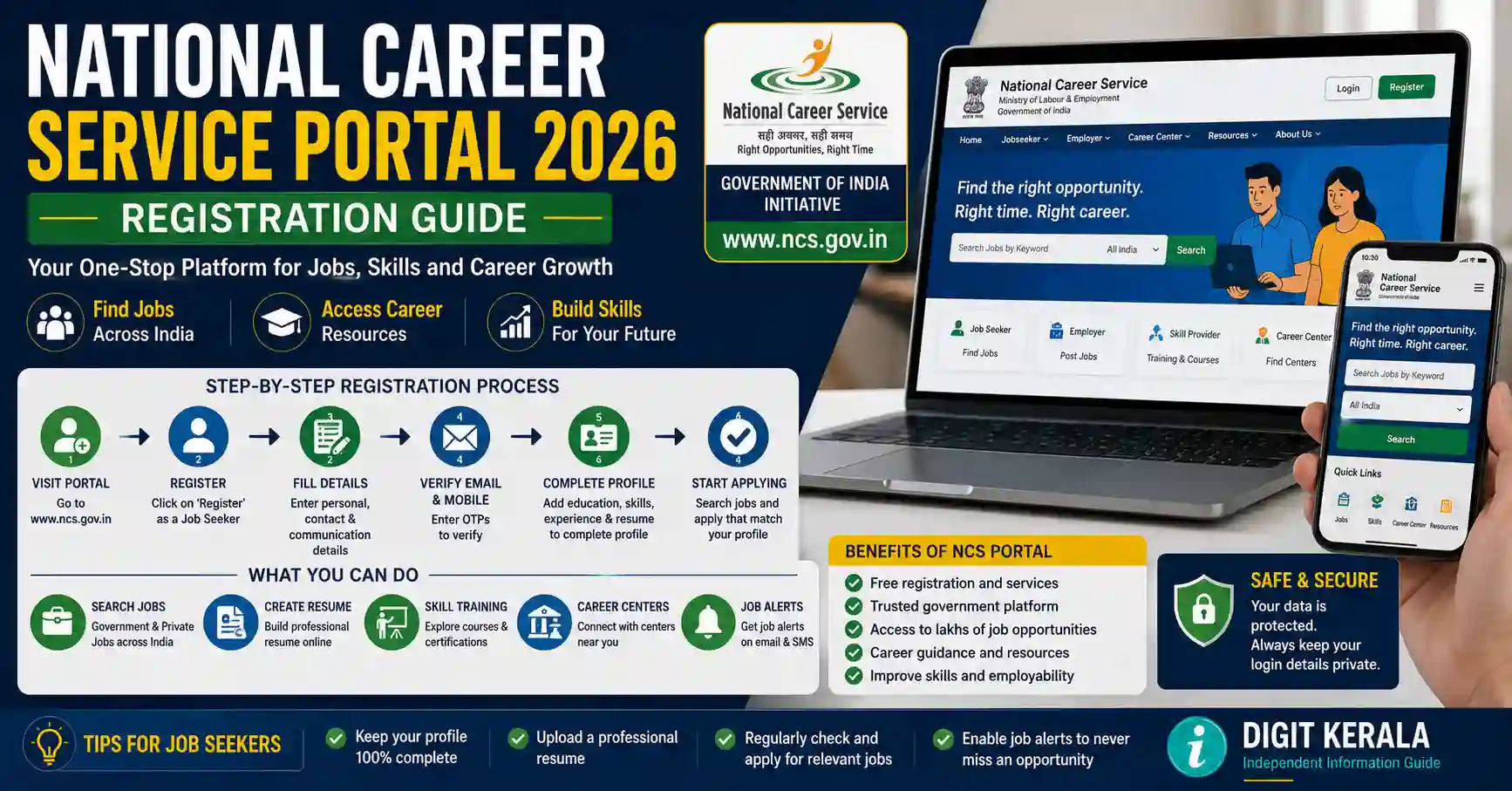
The National Career Service Portal is a Government of India platform that connects jobseekers with employment-related services. Users can create a jobseeker profile, search for available opportunities, explore job fairs, find career counsellors and access information about skill-development programmes.
The portal is managed by the Directorate General of Employment under the Ministry of Labour and Employment.
NCS clearly states that its services are free. It does not charge jobseekers for registration, job applications, interview processing or other employment-related services.
This guide explains how to register on the National Career Service Portal, complete a profile, search for suitable opportunities and protect personal information while applying.
Important: Registration on NCS does not guarantee employment, an interview or selection. Every vacancy has its own eligibility conditions and selection process. Applicants must verify the complete details before submitting an application.
What Is the National Career Service Portal?
The National Career Service Portal is an official employment-services platform of the Ministry of Labour and Employment, Government of India.
It provides online facilities for different groups, including:
- Jobseekers.
- Employers.
- Career counsellors.
- Career centres.
- Placement organisations.
- Skill providers.
- Government employment services.
The platform is intended to make career and employment information accessible through a common portal.
NCS itself is not the employer for every vacancy displayed on the website. Applications and final recruitment decisions are handled according to the process stated by the relevant employer or recruiting organisation.
Services Available for Jobseekers
The facilities displayed on the NCS portal may include:
- Domestic job search.
- Government-job information.
- International opportunities connected through eMigrate.
- Jobs for women.
- Jobs for persons with disabilities.
- Jobs for ex-servicemen.
- Healthcare-sector opportunities.
- Internship opportunities.
- Job fairs and career events.
- Career counselling.
- Career-centre search.
- Skill-course information.
- Skill-provider search.
- CV or résumé-building facilities.
- Career and employability resources.
The availability of a service, vacancy, course or counselling session can change. Always check the current portal information.
Is NCS Registration Free?
Yes. The official NCS website states that its services are provided free of cost.
NCS does not charge a fee for:
- Jobseeker registration.
- Creating a profile.
- Searching for vacancies.
- Applying for jobs through the portal.
- Interview processing through NCS.
- Other NCS employment-related services.
NCS also advises jobseekers not to pay fees to employers.
A vacancy may occasionally refer to a separate official recruitment process governed by another authority. For example, an examination authority may prescribe an application fee in its official notification. Such a fee should be paid only through the authorised portal after independently verifying the notification.
Never pay money merely because someone claims to represent NCS.
Official NCS Website
The official portal is:
Check that the address ends in ncs.gov.in before entering personal information.
Avoid websites using similar names, copied logos or unofficial registration forms.
NCS warns that fraudulent websites, employers and individuals may falsely claim association with the portal or the Ministry of Labour and Employment.
Who Can Create a Jobseeker Profile?
People looking for employment, internships, career guidance or skill-development information may use the jobseeker section of the portal.
This can include:
- Students.
- Fresh graduates.
- Experienced professionals.
- People returning to employment.
- Persons with disabilities.
- Ex-servicemen.
- Women seeking suitable opportunities.
- People exploring domestic employment.
- Eligible applicants exploring overseas opportunities.
- Workers interested in improving their skills.
Registration does not make a person eligible for every vacancy. Education, age, experience, skills, licences and other requirements differ between employers and positions.
Information to Keep Ready Before Registration
Applicants may find it helpful to keep the following information ready:
- Active mobile number.
- Personal email address.
- Correct name and date of birth.
- Current address.
- Educational details.
- Work-experience details.
- Skills and certifications.
- Preferred job roles.
- Preferred work locations.
- Languages known.
- Updated résumé.
- Relevant identity information if requested by the portal.
- Disability or ex-serviceman information when applicable and voluntarily required for the selected service.
Enter information exactly as it appears in supporting documents.
Do not upload unnecessary identity documents. Provide only the information required by the official portal or a verified recruitment process.
How to Register on the NCS Portal
Follow these general steps:
- Open the official National Career Service Portal.
- Select Login/Signup or the current registration option.
- Choose the Jobseeker user type.
- Enter the requested mobile or account information.
- Complete the applicable verification process.
- Create login credentials when requested.
- Enter personal and contact details.
- Add education, experience and skills.
- Select preferred occupations, industries or locations.
- Review the information carefully.
- Submit or save the profile.
- Sign in again to confirm that the profile is accessible.
The exact buttons and verification options may change when the portal is updated. Follow the current instructions displayed on the official website.
Never share a login password or one-time verification code with an employer, agent or unknown caller.
How to Complete the Jobseeker Profile
A complete and accurate profile can help applicants find more relevant opportunities.
Personal Information
Enter the applicant’s correct name, date of birth, contact details and location.
Avoid nicknames when official records use a different name.
Education
Add qualifications accurately, including:
- Course or qualification name.
- Institution.
- Specialisation.
- Completion year.
- Current study status when applicable.
Do not claim an uncompleted qualification as completed.
Work Experience
For each previous position, provide:
- Job title.
- Employer name.
- Employment period.
- Main responsibilities.
- Relevant skills or achievements.
Keep the description factual. Do not invent experience to match a vacancy.
Skills
Add skills that the applicant can genuinely demonstrate.
Examples may include:
- Computer applications.
- Accounting software.
- Customer service.
- Driving.
- Machine operation.
- Data entry.
- Sales.
- Communication.
- Technical trades.
- Languages.
- Industry-specific certifications.
Avoid filling the profile with unrelated keywords.
Job Preferences
Select suitable:
- Job roles.
- Industries.
- Work locations.
- Employment types.
- Experience levels.
Overly broad preferences can produce less relevant results. Select realistic options based on qualifications and circumstances.
Using the NCS CV Builder
NCS provides an online CV Builder facility.
The tool may allow registered jobseekers to add sections such as:
- Profile summary.
- Contact information.
- Education.
- Work experience.
- Skills.
- Languages.
- Job title.
The current NCS CV Builder also displays options for customising a résumé, downloading it as a PDF and adding it to the user’s profile.
Review the generated document before using it. Correct spelling, dates and contact information, and ensure that the résumé reflects the requirements of the selected role.
A résumé template does not guarantee that an application will be shortlisted.
How to Search for Jobs on NCS
After creating a profile:
- Sign in to the official NCS portal.
- Open the job-search section.
- Enter a job title, skill or occupation.
- Select a preferred city or location when required.
- Apply the relevant filters.
- Review the available results.
- Open a suitable listing.
- Read the full description.
- Confirm eligibility and application instructions.
- Apply through the method stated in the listing.
The portal includes sections for domestic jobs and certain specialised categories.
Search using different but relevant terms. For example, a person seeking accounting work might try terms such as “Accountant,” “Accounts Assistant” or “Junior Accountant,” depending on actual qualifications.
Information to Check Before Applying
Before submitting an application, verify:
- Employer name.
- Job title.
- Work location.
- Job responsibilities.
- Required qualification.
- Required experience.
- Skills or licences.
- Employment type.
- Application closing date.
- Salary information, if officially provided.
- Application method.
- Interview location.
- Employer contact information.
- Whether travel or relocation is required.
Do not assume that every vacancy is permanent, government employment or available in the applicant’s home district.
Save a copy or screenshot of the relevant listing for personal reference, while avoiding the public sharing of protected personal information.
Government Jobs on NCS
NCS provides access to government-job information, but applicants should still verify every recruitment through the official website of the recruiting authority.
Before applying for a government position:
- Identify the department or recruitment agency.
- Open its official website.
- Find the complete recruitment notification.
- Verify the notification or advertisement number.
- Check the qualification and age requirements.
- Review reservation and relaxation rules.
- Confirm the application dates.
- Check the official fee and payment method.
- Submit the application only through the authorised portal.
- Keep the acknowledgement and payment receipt.
A summary or listing on NCS should not replace the complete notification issued by the recruiting authority.
International Opportunities and eMigrate
NCS provides a section for international opportunities connected with the Government of India’s eMigrate system and overseas-employment resources.
Applicants considering overseas employment should verify:
- Employer identity.
- Recruiting-agent registration.
- Country and work location.
- Employment contract.
- Salary and permitted deductions.
- Working hours.
- Accommodation and transport conditions.
- Visa category.
- Medical requirements.
- Emigration requirements.
- Insurance.
- Recruitment charges permitted under applicable rules.
Do not travel on a tourist or visit visa based on a promise that employment will be arranged after arrival.
Do not hand over a passport to an unauthorised person. Verify overseas recruitment information using official NCS, eMigrate and Ministry of External Affairs resources.
Job Fairs and Career Events
NCS provides information about job fairs and employment-related events.
Before attending an event:
- Confirm the date and venue on the official portal.
- Check whether registration is required.
- Read the participating-employer information.
- Carry only necessary documents.
- Keep original certificates secure.
- Avoid paying an unofficial entry or interview fee.
- Do not leave original documents with a recruiter.
- Verify any offer received at the event.
Participation in a job fair does not guarantee an interview or employment.
Career Counselling and Career Centres
Jobseekers may use NCS facilities to search for career counsellors and career centres.
Counselling may help users:
- Understand suitable career paths.
- Identify skill gaps.
- Explore education or training options.
- Improve job-search planning.
- Prepare for career transitions.
- Learn about available employment resources.
The portal may display counsellor profiles, locations and available sessions.
Check the current booking process, availability and applicable conditions directly on NCS.
How to Identify a Possible Recruitment Scam
Treat the communication as suspicious if someone:
- Guarantees a job or interview.
- Demands payment before selection.
- Asks for a fee in the name of NCS.
- Requests payment to a personal UPI ID or bank account.
- Uses a free email address while claiming to represent a major organisation.
- Asks for a password or one-time verification code.
- Requests remote access to the applicant’s phone or computer.
- Sends an appointment letter before any credible selection process.
- Pressures the applicant to pay immediately.
- Offers an unusually high salary without checking qualifications.
- Asks for passport or bank details through an unknown messaging account.
- Uses an unofficial website that copies the NCS logo.
NCS states that it does not endorse employers demanding payment from jobseekers.
Checking Employers and Blacklisted Entities
The NCS menu provides a Blacklisted Entities section for users.
Applicants should review available warnings and conduct their own verification before responding to a recruiter.
However, the absence of a name from a warning list does not automatically prove that an employer or agent is genuine.
Also verify:
- Official company website.
- Company contact information.
- Recruitment email domain.
- Interview address.
- Corporate-registration information when relevant.
- Overseas recruiting-agent status when applicable.
- Whether the same vacancy appears on the employer’s official careers page.
What to Do If Someone Demands Money
Do not pay merely to secure a job, interview or NCS registration.
If suspicious communication is received:
- Stop communicating with the sender.
- Do not share additional personal information.
- Save messages, email headers, numbers and payment details.
- Verify the vacancy through the official portal.
- Contact NCS support when its name is being misused.
- Report cyber-enabled financial fraud promptly through the authorised cybercrime channels.
- Contact the bank or payment provider immediately if money has already been transferred.
The NCS portal lists 1930 for cybercrime-related reporting and 1514 as its helpline.
Reporting quickly may help the responsible authorities investigate, but recovery of money cannot be guaranteed.
NCS Helpline and Official Email
The official portal currently displays:
- NCS helpline: 1514
- Support email: support@ncs.gov.in
- Cybercrime helpline: 1930
Use contact details published directly on the official portal because they may be updated.
NCS also identifies official communication addresses using government domains. Check the complete sender address rather than trusting the display name alone.
Protecting Personal Information
Job applications may contain sensitive information.
Follow these precautions:
- Use a strong and unique password.
- Do not share verification codes.
- Sign out on shared devices.
- Avoid public computers for applications involving identity documents.
- Do not publish a full résumé containing an address and phone number.
- Share identity documents only when genuinely required.
- Mask unnecessary identity numbers where permitted.
- Never share a bank PIN, card CVV or online-banking password.
- Do not install unknown applications for an interview.
- Avoid opening files or links from unverified recruiters.
- Keep copies of submitted applications and acknowledgements.
An employer does not need a candidate’s banking password or payment verification code for recruitment.
Common NCS Registration Problems
Verification Code Is Not Received
Check the entered mobile number, network coverage and blocked-message settings. Wait briefly before requesting another code.
Do not make repeated attempts in rapid succession if the portal temporarily restricts requests.
Unable to Sign In
Confirm the registered mobile number, user ID and password. Use the official account-recovery option when available.
Do not pay an agent to recover an NCS account.
Profile Is Incomplete
Review each profile section and provide the required information. Check whether education, experience, skills or preferences are missing.
Irrelevant Jobs Are Displayed
Update job preferences and search using more specific skills, roles and locations.
No Suitable Vacancy Is Available
Vacancies change over time. Update the profile, improve relevant skills and check the official portal periodically.
Do not apply for unrelated jobs simply to increase the number of applications.
Frequently Asked Questions
Is National Career Service a government website?
Yes. The NCS portal is managed by the Directorate General of Employment under the Ministry of Labour and Employment, Government of India.
Is NCS registration free?
Yes. NCS states that its registration, job-application, interview-processing and other employment-related services are free.
Does NCS guarantee a job?
No. Registration or application does not guarantee an interview, offer or selection.
Can freshers register?
Jobseekers, including students and fresh candidates, may create profiles and explore suitable services and opportunities.
Can experienced professionals use NCS?
Yes. Experienced candidates can add their employment history and search for roles matching their skills.
Can I search for government jobs?
The portal provides a government-job section. Applicants must verify every vacancy through the recruiting authority’s official notification.
Does NCS provide overseas jobs?
NCS provides international-job and eMigrate-related resources. Applicants must complete all required employer, agent, contract, visa and emigration checks.
Should I pay an employer for a job listed on NCS?
NCS advises jobseekers not to pay fees to employers. Treat payment demands cautiously and verify them through official channels.
What is the NCS helpline number?
The official portal currently displays 1514 as the NCS helpline.
Official References
- National Career Service Portal
- NCS Job Listings
- NCS CV Builder
- NCS Career Counsellors
- NCS International Resources
- Ministry of Labour and Employment
Last reviewed: August 30, 2026.
Disclaimer: DIGIT KERALA is an independent information website and is not affiliated with the National Career Service, Directorate General of Employment, Ministry of Labour and Employment or any employer. We do not provide recruitment, accept job applications, collect recruitment fees or guarantee interviews and employment. Portal features, vacancies and application procedures may change. Always verify the current information through the official NCS portal and the recruiting organisation’s authorised website before applying.